How to Bypass Google FRP Account Using OTG Cable
The second way to perform FRP lock bypass is using OTG cable, which is not recommended. So before you try, here are some limitations of this way that you should learn.
The Cons of Using OTG Way:
You should prepare a USB drive and an OTG cable (this is different from a USB cable).
There is no guarantee that the method will work on your device. It just works for some specific devices.
Step 1: Using your computer, visit this link to download a third-party apk to help you with the FRP bypass.
Step 2: Copy the downloadeded apk to your USB flash drive.
Step 3: Turn on your Android device on which you want to perform the FRP lock bypass. Try to follow the setup, when it asks you to verify your Google account, connect the USB flash drive to your device. For this, you will need to use an OTG cable.

Step 4: Once the file manager app pops up on your device, locate the apk and then install it on your device.

Step 5: When the pop-up “Install blocked” appear, click “SETTIINGS”.
Step 6: Then check “Unknown sources”. Tick “Allow this installation only” and click “OK”.

Step 7: Click “INSTALL” and it will start install the apk on your device. When it finishes, click “OPEN”.

Step 8: Now find the “Backup and reset” option from your device settings. Confirm to erase everything from it.

Step 9: Finally, your device should reboot normally. You now can set it up without verifying any account.
How to Perform FRP Lock Bypass without OTG
Before you try to figure it out, you’d best learn some of this way’s cons because it’s not easy to perform.
The Cons:
The method works on Samsung devices only. There is no guarantee it can work on newer Android versions.
You need to be able to access to your device settings.
The steps may be different for different device model. Sometimes, it may be hard for you to complete the whole process.
You should have an Samsung account.
Step 1: Visit this link to download and install SideSync on your PC. Run SideSync on your computer.
Step 2: Turn on your Android device and follow to set it up. When you see the “Verify your account” page, connect your device to the computer using a USB cable.
Step 3: On the popup that appears on your Android device, select Chrome. Accept all terms and click “NO, THANK YOU” to set up Chrome.
Step 4: In the Google searcher, type in download.hardreset.info.
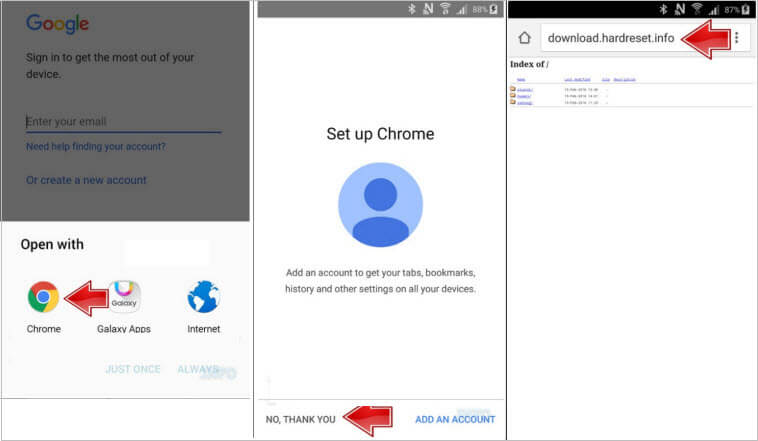
Step 5: Open Samsung folder and then Samsung Bypass Google app and click OK to confirm downloading.
Step 6: Go back to the following screen and click OK. Then enter Galaxy Apps.

Step 7: Click Agree then. Then click Apps Searcher.
Step 8: Type ES File Explorer in the search bar and tap on the right app. Click Install for the explorer app.

Step 9: Sign into a Samsung Account. Tap Install again and then Accept and Download.
Step 10: When it finishes downloading, tap Open button.

Step 11: Select Download from the top and open the Samsung Bypass Google app.
Step 12: Click Install from the pop-up Properties window. Then click SETTINGS option when you’re told Install blocked.

Step 13: Tap OK for the Unknown sources and click Install then.
Step 14: Wait for it to finish and you can click OPEN. You now can access your device settings.

Step 15: From the device settings, find and confirm Backup & Reset to erase everything from your device. When it’s done, you now can set up the device without entering the Google account.
Conclusion
If you cannot access all the features on your Android device because the smartphone has the FRP lock, the solutions in this article are ideal for you. Although you can use all the solutions outlined above to bypass Google account FRP
Also Read:Adult Games for Android in 2019
Also Read:Best Project Free TV Alternative
Also Read:22 Best Websites Alternative to RouletteB in 2019
Also Read:Forward Calls on iPhone Xs/X/8/7/6s for Busy Time
Also Read:7 Best Alternatives to Megashare for Movie Watching in 2019
Also Read:Unbrick Your Bricked iPhone XS/XR/X/8/7 in 2019


I Want to use this medium to appreciate an online ghost hacker, after being ripped off my money he helped me find my cheating lover and helped hack his WHATSAPP, GMAIL and kik and i got to know that he was cheating on me, In less than 24 hours he helped me out with everything, hacking setting is trust worthy contact him via: hackingsetting50@gmail.com
ReplyDelete